New on the Growing plan
Every seller gets their own shopping link
Each seller on a recipient's roster now gets their own shopping link, shopping QR code and seller page. When anyone shops through a seller's shopping link, the purchase is credited to that seller automatically: no names to type after checkout, and no order forms to tally.
What's new
Until now, each recipient had one shopping link and one shopping QR code, and customers named their seller after checkout, on the order confirmation page, if they remembered to. Now every seller on the roster gets their own:
- A shopping link that credits the seller and their recipient. Families share it by text, email or social post.
- A shopping QR code that opens it, with the seller's initials in the corner so it's easy to tell from the recipient's own.
- A seller page of their own, with their shopping link and shopping QR code, messages ready to share, and what they've raised so far.

Why it matters
In a product fundraiser, credit is everything. Sellers work toward prizes, the leaderboard keeps them going, and organizers need to know who sold what. Paper order forms get lost, and a name typed after checkout can be misspelled, shortened to a nickname or forgotten, leaving the order credited to no seller at all.
A seller's shopping link carries the credit with it. A grandparent across the country opens the link, shops your store, and the order is credited to the right seller and the right recipient. On the order confirmation page the seller is already picked, though the buyer can still change it, and every purchase still counts toward the recipient's total.
Easier for every seller
-
Nothing to sign up for
A seller page opens from its link. There's no account, no password and no app.
-
Ready to share
Messages written for a text, an email and a social post, each with the seller's shopping link and when purchases count.
-
Something to hand out
A printed page with their shopping QR code and shopping link, to send home, pin to the fridge or take door to door.
-
Progress they can see
What they've raised and how many orders they have, and their place on the leaderboard when the recipient's status page shows it.
-
In their inbox
An intro email with their shopping link, shopping QR code and seller page, sent when an organizer clicks Send.
-
Credit that sticks
Nobody has to remember to type the seller's name: the link carries it, and the last link a buyer opens wins.
And for organizers
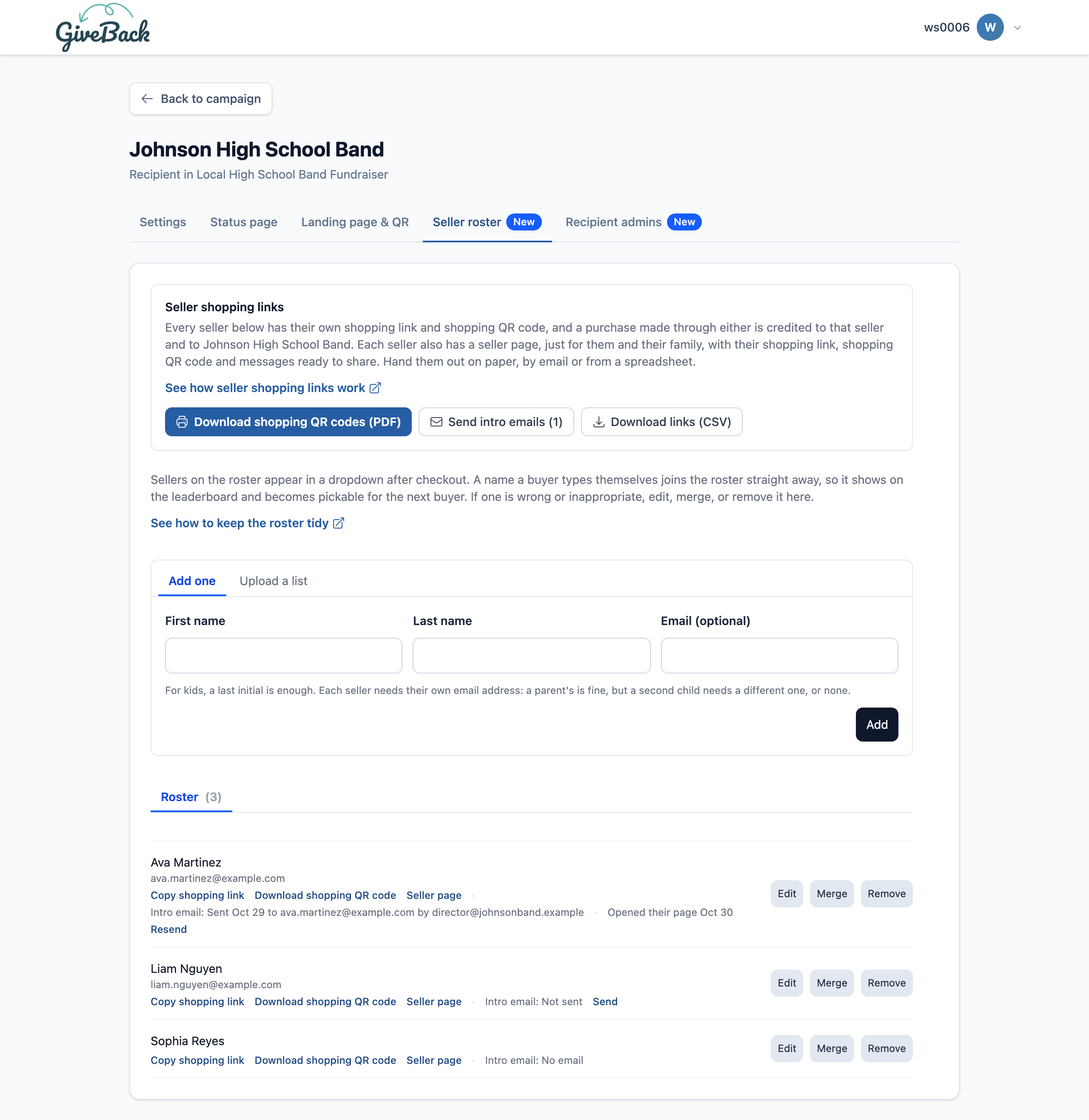
You, or the recipient's own admins in the recipient admin portal, add sellers to the roster one at a time or as a list. Then, from the roster's Seller shopping links box:
- download every seller's shopping QR code as one printable PDF, a page per seller;
- download every seller's shopping link and seller page as a spreadsheet, for a mail merge;
- send every seller their intro email in one click, with replies going to whoever clicked Send.
Rename a seller or merge duplicates, and their shopping link keeps working.
How to start
- On the Growing plan, use the URL / QR Code method for your campaign and ask customers for the seller's name.
- Add sellers to each recipient's seller roster, with an email for each one you want to send an intro email.
- Hand out the shopping QR codes, send the intro emails, and follow the leaderboard on the recipient's status page.
What it costs
Seller shopping links come with the Growing plan: $49 a month after a 7-day free trial, with nothing extra per seller or per sale. Stores already on Growing have them now.